We have been struggling with this concept for a while, being an ISV with many customers who use our products on SharePoint 2007 and 2010 and are interested in upgrading to SharePoint 2013, but using the deferred site collection upgrade approach.
You see, in this approach you upgrade to a SharePoint 2013 farm but still run your 2010 sites in SharePoint 2010 user interface, while allowing site owners to gradually upgrade to 2013 interface gradually.
The problem this poses for us was simple: which version of my solution do I install on that hybrid farm?
SharePoint 2010 solution will work on the 2010 experience sites, but will not work on those that were already upgraded to 2013 or on new sites created in 2013 experience.
SharePoint 2013 solution will work on the upgraded sites or new sites, but not on sites still using the 2010 user interface.
First try (didn't work)
Installing both versions seemed to be the solution, but we had a few issues with that approach:
1. Our 2010 and 2013 WSP solutions have the same solution ID, thus cannot be installed on the same farm at the same time
2. Both 2010 and 2013 WSP packages contain the same DLLs assemblies, and so if we retract one – it will remove the shared DLLs and break the other. So, when upgrade is done and we want to remove the 2010 package it will break the 2013 package.
Working approach
After working closely with the good people at Microsoft, we run some tests and come to the following procedure that would work for us (and possible for everyone in this situation):
1. Install the 2013 solution
2. Create a new package that adds 2010 backward compatibility (called “2010 BC”) that installs only the needed resources and use it during the deferred site collection upgrade period
3. Once that period is over and everything was upgraded – remove the “2010 BC” package *
This approach seems to be working great on our testing, but we still had the 2 issues to deal with (DLLs and solution ID) and I didn’t want to burden our R&D with maintaining and producing another package for every product.
Tools of trade
So, I am happy to share with you a new codeplex project I just released for this purpose:
“WSP REpackage tool” found here:
https://wsprp.codeplex.com/
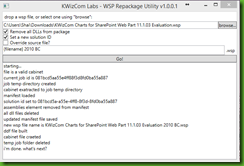

This tool will take your existing 2010 solution package, and repackage it as a new WSP file with a new solution ID and without the assemblies inside. This new package will be the “2010 BC” package that you can safely install on your SharePoint 2013 farm along with the SharePoint 2013 solution to be able to support both 2013 native sites and upgraded sites that still use 2010 user interface.
I hope this tool helps you guys support this great new upgrade experience for SharePoint, I am happy to announce KWizCom products were tested and now support the deferred site collection upgrade also using our Web Installer experience that allows you to directly download and install our products and (now) add support for 2010 BC sites with just a few clicks (tool available here:
ClickOnce installer)
If you have thoughts, comments please feel free to either comment here or on the discussion in the codeplex project.
I would love to hear what you think about this tool and this upgrade approach in general.
Shai.
* Very important edit note: after discussing with Microsoft, if you retract the 2010BC solution or the 2013 solution using the central administration - even though these solutions now do not share the same solution ID and are set to different versions of SharePoint, they will remove each other's files from both SharePoint root folders (14 and 15). This is a know issue, and MS advised me that the only supported way to retract packages is by using PowerShell with the correct -CompatibilityLevel version flag.
http://technet.microsoft.com/en-us/library/ff607873(v=office.15).aspx So please be advised.


